Showing posts with label AI Art works. Show all posts

2025-08-30

Two version with one prompt

Sometimes I like to work with several AI Art Generators and one prompt, and everytime I am surprised how different the results can be. 

The image on the right was created using Piclumen AI, which has a nice free version. You are getting reward points by uploading your images to social media (pinterest for example) and liking and commenting other people's creations.


The image on the left was created using Nightcafe Studio. Here you get reward points by showing up every day.


2025-06-26

Robin "The Cat" Hood


As you might know you can use Grok to help you with prompts. So I asked:

I am an AI artist and I want to create an image depicting a cat disguised as robin hood. Can you provide me with a prompt, please?

Grok answered with:
A whimsical, highly detailed digital painting of an anthropomorphic cat dressed as Robin Hood, standing in a lush Sherwood Forest. The cat has sleek tabby fur, a mischievous grin, and wears a green feathered cap, a leather quiver with arrows slung over its shoulder, and a flowing emerald cloak. It holds a finely crafted bow in one paw, poised confidently atop a tree branch, with dappled sunlight filtering through the leaves. The background features a medieval forest setting with soft mist, scattered gold coins, and a hint of a distant castle.

So I used this prompt and asked Grok to create an image. You can see the result on top of the page on the left hand side. 
Not bad, but I was curious and wanted to find out what Bing would do with the prompt. Here's one of the four images Bing created:

As you can see, there are similarities and differences between the two images. 

2024-07-07

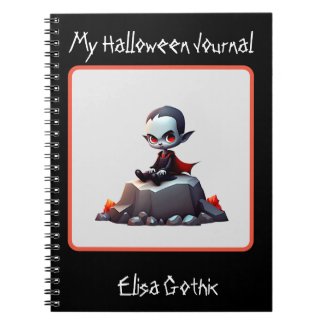
Creating a Halloween design for my Zazzle shop with AI

What you're seeing below is one of my latest products in my Zazzle shop - a notebook showing a grumpy vampire sitting on a rock. I created the design with an AI Art Generator. In earlier times I had created designs with Inkscape or even with my watermedia paintings. And yes, using AI art quickens up the production process - once you've got the image, you can enhance it (there are free online tools for that), remove the background, upload it to Zazzle and create a product with it.

But: not every image created with an AI Art Generator is a good one or one which would look good on a product. In addition to that you will need something special in order to make the design and the product stand out. That means: Trial and error, trial and error. It takes time. Not to speak about the fact that not every design looks good on every product - but that is the case whether you create a design digitally or in the traditional way.

2024-04-19

What you can do with left over paint

I use a small yoghurt container for mixing my watercolor inks. Sometimes the ink will be used up when the painting is finished. But sometimes there is still paint left. 

I painted this tree with leftover paint, a mixture of vermillion and night blue. It is not more than a quick sketch, but in doing this I practised brushstrokes with my waterbrush. In addition to this I practised my handling of adding water to the paint (I added tiny drops with a dropper).

But I did not stop here. I thought "Why not use this quick sketch as a starter image?


At first I tried Playground AI, giving the starter image a strength of 40. As you can see Playground did use the color but changed the tree somewhat. 
Playground gives you a very user friendly way of handling the starter image. You can change the strength of it gradually. 

So I tried a higher strenght, and got the image below. Here the strength is 50, and you can see that is is more similar to the painting, but still has another feel to it.


What did I learn?

1. With watercolor inks no left over paint is lost. You can still do a rough sketch with it.

2. With AI you can change this rough sketch into something worth keeping.

2024-03-30

Happy Easter

Happy Easter! May your Easter holidays be peaceful, creative and joyful!


2024-03-04

Abstract stained glass

This abstract stained glass image was created using my latest marker painting as starter image. If you compare the two images you will see that the AI Generator (in this case: Openart AI) only used some of the colors but apart from that created a totally different image.

I love stained glass art in general and I love how this style is represented in the image on the left. 
 

2024-02-19

Fluffy monsters


I did this monster quite some time ago with gouache. My aim was to use a limited palette and to get more familiar with my gouache paints.

I scanned the painting and added it to the folder "scanned documents" - and there it was until today when I was looking for an image to use as starter image.

As I mentioned before not every AI Art Generator which allows the use of starter images creates good images. Playground AI is one of the AI Art generators I go to when I use starter images.


The image on the right has the same color palette as the starter image, but otherwise the differences are quite big. I like the fluffy guy, but I wanted to create something more similar to the original painting.

Now there are two ways to do that: You can change the weight of the starter image, and you can change the seed number.

I did that, and look what I got now:


This image is way more similar to the original starter image. The style is that of a 2D illustration, and the only thing which differs from the starter image are the eyes in his face.


2024-01-31

Cute Lioncubs

 I definitely like cute animals. So I try to generate them with AI Art Generators. Here are some examples:

Here's a kitten holding a red heart, created with Full Journey. 

Full Journey once was Bluewillow AI. You get 4 images with one prompt, and you can use the images commercially. Full Journey is not totally free - you are paying for each prompt with one credit. However your credits are filled up to 50 every month or so. The quality is quite nice, and you can choose the aspect ratio. 


This cute lioncub was created with Nightcafe Studio. Nightcafe Studio is not free either. You pay 1 credit for one image. However, you can earn additional credits: You get 5 credits for logging in, 3 credits for publishing your image on instagram, 2 credits for voting in the daily challenge. In addition to that you get 5 credits for every five images you create.

The creations can be used for commercial purposes (for example as designs on print on demand websites).


The third example of a cute lioncub was generated with Bing Image Creator. Bing only offers 1:1 aspect ratio. At the beginning you could read on the website that commercial use is not allowed; in the meantime it looks like there is no such explicit restriction anymore. 

Bing is free for anybody who has a Microsoft account. You do not have to pay any credits; you have so called booster points which help to generate your images faster. You can also earn additional booster points by answering certain questions.


2024-01-26

Cubist cityscapes - a comparison

 Many AI art generators allow the use of an init or start image. Some do not. In my humble opinion the use of start images (which in my case are scans of my own paintings or illustrations) allows to create images which are special and unusual in a certain way. In this blogpost I will give an example.

The subject I chose is "Cubist cityscape". 


One of the AI Art generators that does allow using a start image is PicFinder AI. But in this case I did not want to use this way of creating images; I used the prompt "cubist cityscape". You can see one of the results on the left. Yes, the style is cubist, but the result is not very spectacular.

So I went to Nightcafe Studio and uploaded a painting which I did years ago with acrylic paints.


I remember that I had something of a cityscape in mind when I painted the image. But I do not do much planning when I am painting. Often I just paint, add one colour to the other, draw lines, paint lines and so on. 

I did not think much of the painting, and so the painting itself stayed in the folder, and the scan on my hard drive, until the moment when I thought it could be used as a starter image.

And here's what Nightcafe Studio did with the starter image. The style is cubism; the angle is taken from the starter image as well as some of the colors. They are muted, not as happy and vivid as in the image which I created with picFinder.

I think that using the starter image made it possible to create something away from the mainstream.


2023-12-11

Painted Stones

I've got quite a collection of Acrylic Paintmarkers, and beneath other things they can be used to paint on round stones. Of course the first thing to get are the stones. Then the question arises "What shall I paint on these surfaces?"

Well, here comes in Artificial Art Generation. 

This is an image I created with Full Journey. You can see birds, flowers and trees on the stones. In my opinion it is very inspiring and can give you many ideas what to paint on those stones.

So creating AI Art and traditional art is not an either / or. AI Art can help you with your traditional art projects quite a lot!

2023-11-03

Having fun with rubberducks


Everybody has a certain image in his or her mind when somebody says "rubberduck". So why not create images which show those critters in a strange surrounding?

This image was created with Nightcafe Studio and the following prompt:

a portrait of a rubberduck swimming in the bathtub, cubism, insanely detailed


The surroundings have changed quite a lot in this image.

And here is the prompt I used with Nightcafe Studio:

a rubberduck swimming in the bathtub, cubism style, insanely detailed

As you can see, I left out "portrait" in the prompt.

2023-10-30

Halloween


I must admit that I do not celebrate Halloween. I am far too old for that. Halloween does not have a tradition in Germany - however why should kids not have fun with dressing up as witches, vampyres or skeletons? 

But I could not resist creating an image for Halloween - this time with Stablecog AI.

Have fun everyone!

2023-10-27

Traditional Art vs AI Art?

 Many traditional artists reject AI Art. I consider myself a traditional artist also - having painted with acrylics, alcoholbased markers, gouache and other watermedia. In November 2022 I got in contact with Nightcafe Studio, and since then have created a lot of AI Art pieces. I must admit that for some time (actually some months) I did not touch a brush, opened a paint tube or painted with markers. 

But then I felt a rather heavy urge to do traditional art again, first with inktense pencils and then with acrylic inks. However I still continued creating art pieces with Artificial Intelligence Art Generators. For me it is not either that or this, it is both.

I like how I can apply acrylic ink on a surface (mostly watercolor paper) and how I can get various shades and hues by mixing those inks.

But I also like how to create images with words, to experiment with various art generators and the order of the words in a prompt. 

I am grateful that I have both ways to be creative!

2023-10-11

New AI Generator: Full Journey

There are lots of AI Image Generators on the web, and there are a lot of changes going on. I once used Lexica, which now seems to be almost dead. I used Clipdrop for quite some time, and since last weekend their website seems to undergo a lot of changes and /or bugs.

On the other hand, there is always something new to try out and explore. For example there is Full Journey AI. It is a bit similar to Midjourney because it only runs on discord, but the commands are different. There is a free plan which gives you 50 tokens / credits every month. 

I quite like the quality of the images. You get four images with each prompt, like with Midjourney AI.

The prompt for this image was:

still life with crystal glasses, in the style of Rubens -43

The second thing which I was very pleased with was the quality of the service; I asked a question regarding how I could get the info about my remaining tokens, and it did not take more than 5 minutes untill I got the answer. 

2023-10-02

Styles in Clipdrop

During the last days I have focussed on Nightcafe Studio and ClipDrop AI. Nightcafe Studio offers SDXL 0.9 and ClipDrop offers SDXL. Whereas in Nightcafe you pay with credits, in ClipDrop AI you get 100 images per day in the free Account. 

You can choose between various styles in ClipDrop (and various aspect ratios as well). I used the following prompt:

 PROMPT: Beautiful glass sculpture of a dove, intricate, realistic

I chose Photography as style for the first image, and Fantasy Art as style for the second image.


2023-09-04

Promptcrafting: The order of words is important!


The prompt for this image on Openart AI was:

painting of a stack of pumpkins in front of a cottage in the style of Anne Stokes

Well, this image looks like a hoard of pumpkins is going to overtake the nice little cottage house. It could be used for a horror story like "The night of the killing pumpkins" or "Pumpkins took revenge for being mistreated by human beings". Not at all what I intended to create...

Now, one has to keep in mind that the word order is very important to AI Image Generators. 


So I decided to change the prompt into:

beautiful cottage house with pumpkins in the garden in the style of Ivan Bilibin, Ernst Haeckel, Daniel Merriam, watercolor and ink

The words "beautiful cottage house" in the beginning of the prompt leads to the fact that the house is actually in the focus and you can see that the pumpkins have about the right size.

2023-08-30

Vectorize AI

 In some cases Vectorizer AI is the right tool for enlarging images created with AI Image Creators. 

Here's an example:


I generated this troll with the use of Dreamlike AI. The dimensions of the image are: 576x704 pix, much too small for any use on print on demand stores.

I had learnt about Vectorizer AI a few days ago and also watched a video. I am always open for anything new, so I wanted to try it out.

Now step 1 is to have the background removed, together with the strange parts on the right. There are some background removing tools online, I went for clipdrop's tool.

Now step 2: upload the image to vectorizer AI. Here the result:


Now the size is 2304 x 2816 px. You probably won't notice the changes on the image much, but you will see them when you open it with a picture processing program like Photoshop or Gimp.

Vectorizer AI is free and it is still in Beta. It does not work with every image; but I will try it again!