2026-05-27

How to create Mockups for my Zazzle store with Dynamic Mockups


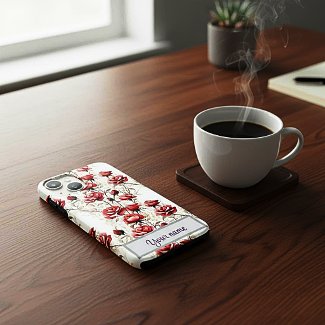
Zazzle offers some mockup images for certain products, but not for every product. If you want to present your Iphone case design, for example, you better look somewhere else for a nice mockup. 
Now there is a platform called placeit which offers free phone case mockups, but you don't want your Iphone design mockup look like many others, do you?
Well, I found a solution for this. There is a platform called "Dynamic mockups". There are several ways to create a product mockup, but I use it the following way:
  1. I upload the product in question to the platform.
  2. I click on the "scene" button. A lot of scenes are offered now, I tried some of them but wasn't very pleased with the result. So I go to the bottom of this category. There you can insert your own scene prompt.
  3. Now you can just insert a description of your scenery, or you can ask AI for it, copy the text you get and insert it. 
  4. As a free user you have three images daily. Once it happened to me that I wasn't satisfied with the three results at all and had to try the day after. 
  5. In case you are satisfied with the result you can download the image and upload it to Zazzle. 
2026-05-20

Acrylic inks and alcohol markers

There are several ways I have been combining acrylic inks and alcohol markers:

  1. I have been using a black marker for painting the background. 

  2. While painting with acrylic inks I left several spots blank and filled up the blank space with a marker when the acrylic ink had dried. In this painting I used markers in several shades of green and a yellow marker.

  3. I found out that markers go very nicely over dried acrylic inks. In the painting you can see several spots of orange - here I went over washed out red acrylic ink with a yellow marker. 
 

2026-05-13

Acrylic Inks Watered down


This abstract painting was done with acrylic inks mostly. The yellow patches and the black background were painted with alcohol markers. The surface I used was watercolor paper. 

First I did a rough sketch with a pencil and a ruler. Then I added two drops of olympic blue into a small plastic container. I applied the paint on some spots. After that I added more and more drops of water in order to get a watercolor like effect. I did the same with Indigo blue acrylic ink: first I used the ink as it came out of the bottle, then I watered it down. In some spots I applied a second layer of watered down indigo.

I am quite satisfied with the result and will play some more with my acrylic inks.


2026-05-06

How I use AI for my Zazzle Shop


There are several ways I use AI for my Zazzle shop. Here are three of them:
  1. I am an AI artist, so I create images with several AI Art generators. Often I use my own prompts; but in some cases I let AI help me to refine my prompt ideas.
  2. I use google.gemini to help me select the products which are most apt for my images. Not every image looks good on every product. So I upload my image to Google Gemini and ask which products it would look good on. Sometimes it will mention products I had not even thought of.
  3. A good title, description and good tags are essential for the product to be found in search. So I save my design, take a screenshot of it and upload it again to Google Gemini. I review the result before publishing the product in my Zazzle shop. Sometimes I change something. Then I hit the "Sell" button.