Showing posts with label mockups. Show all posts

2026-06-30

Why product mockups are so important

There are products on Zazzle with pretty mockups created by Zazzle. But there are also products which have no mockup image. One of these products are aprons. 

When I created the design for the apron AI did not yet exist, and there was only a very complicated way to create mockups using photoshop. I must admit that I had a look into that and decided it would take too much time to get anywhere near creating something reasonable.

However, with AI today, there are two ways to create nice mockups. 

  • Use Dynamic mockups
  • Use Chatgpt
Mockups make your product interesting for customers. Especially on such a large platform like Zazzle it is important to get the attention of potential customers, and you can do this by creating interesting mockups.
This will force you to think about your designs and your possible customers: Will gardening people love to wear this apron? 
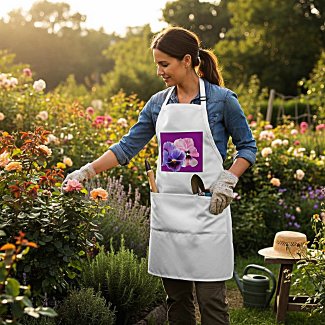


Or will someone who obviously loves to have plants and flowers at their home love to wear it?
By the way, the upper mockup was created with Dynamic Mockups, and the one on the left with Chatgpt.

2026-05-27

How to create Mockups for my Zazzle store with Dynamic Mockups


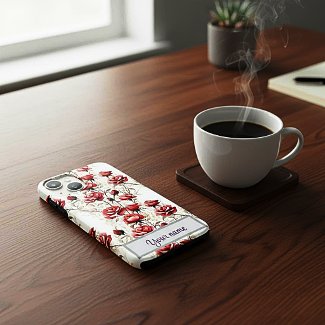
Zazzle offers some mockup images for certain products, but not for every product. If you want to present your Iphone case design, for example, you better look somewhere else for a nice mockup. 
Now there is a platform called placeit which offers free phone case mockups, but you don't want your Iphone design mockup look like many others, do you?
Well, I found a solution for this. There is a platform called "Dynamic mockups". There are several ways to create a product mockup, but I use it the following way:
  1. I upload the product in question to the platform.
  2. I click on the "scene" button. A lot of scenes are offered now, I tried some of them but wasn't very pleased with the result. So I go to the bottom of this category. There you can insert your own scene prompt.
  3. Now you can just insert a description of your scenery, or you can ask AI for it, copy the text you get and insert it. 
  4. As a free user you have three images daily. Once it happened to me that I wasn't satisfied with the three results at all and had to try the day after. 
  5. In case you are satisfied with the result you can download the image and upload it to Zazzle. 

2023-11-20

Creating Mockups for Your Zazzle shop

For quiet some time Zazzle is providing some Mockups together with the product you have created. However Zazzle encourages to create your own mockups, be it that you take photos with the product itself (which requires that you bought the product), or creating mockups using online mockup generators. 

Smartmockups.com
Smartmockups.com is a website which offers a lot of mockups - for mugs, t-shirts, cards and a lot of other products. Say you want to create a mockup with a mug. Select "mugs" and then "free" and you get all the free mug mockups you can use.

Which Zazzle products do you want to promote via Mockup?
Creating mockups is not very difficult, but it is time consuming. So I go through my store and look for products which I think could do with a bit of promotion on the one hand. Then I go to smartmockups.com and look which products offer the most free mockups.
After that I go to the product, go to "download" and download the design. This is the file you have to upload to smartmockups.com in order to place it on a mockup.

Edit your designs on the Mockup!
You can edit the design on the mockup - enlarge it or move it. Try to make it look as similar to the real product on Zazzle as possible.

Upload the mockup image to Zazzle
I have a free account on smartmockups.com which means that the images I download from there are relatively small. It could be that Zazzle requires a bigger image. However, there are several free photo enhancers on the web. Use one of them and then try it again. 

All in all, the process of creating mockups is time consuming, especially if you are just beginning to do this. So, as I said before, focus on the products you want to promote!

And here is one of my Mockups. You will find the mug here.