Showing posts with label ChatGPT. Show all posts

2026-06-30

Why product mockups are so important

There are products on Zazzle with pretty mockups created by Zazzle. But there are also products which have no mockup image. One of these products are aprons. 

When I created the design for the apron AI did not yet exist, and there was only a very complicated way to create mockups using photoshop. I must admit that I had a look into that and decided it would take too much time to get anywhere near creating something reasonable.

However, with AI today, there are two ways to create nice mockups. 

  • Use Dynamic mockups
  • Use Chatgpt
Mockups make your product interesting for customers. Especially on such a large platform like Zazzle it is important to get the attention of potential customers, and you can do this by creating interesting mockups.
This will force you to think about your designs and your possible customers: Will gardening people love to wear this apron? 
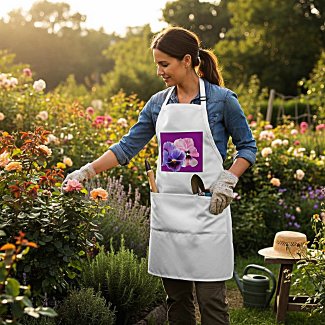


Or will someone who obviously loves to have plants and flowers at their home love to wear it?
By the way, the upper mockup was created with Dynamic Mockups, and the one on the left with Chatgpt.

2024-04-05

How to use ChatGPT to create a refined prompt

Are you familiar with the expression "being afraid of the blank page / white canvas"? I must admit that more than once I felt like that when I tried to think of a prompt to use with one of the numerous AI Art Generators I am creating images with. Well I discovered a method for myself which helped me to deal with that kind of feeling and I want to share it with you. 

1. PromptSilo
PromptSilo is a webpage where you can find all kinds of information to put into a prompt. It gives you ideas for a prompt. For example you want to create an image which depicts a landscape with certain plants or flowers. It gives you a list of flowers, trees, whatever you like. You want to create a painting of this landscape in a certain style - just click on the artist.

This is what I got:
 bouganvillea trees style of Edgar Degas daylight

2. ChatGPT
The second step is to ask ChatGPT to refine the prompt. Here is the refined prompt:
Capture the graceful essence of bougainvillea trees in the style of Edgar Degas, bathed in the soft glow of daylight

3. Submit the prompt to an AI Art Generator (in this case: Bing Image Creator)


Here is the image created with the above prompt.

Once you have a refined prompt you can change it easily. You can replace the kind of tree you want to see, you can change the style, you can change the light. The possibilities are endless!


2024-02-21

Using ChatGPT for creating prompts for AI Art

 I had created a few monster AI images using my own art as start images. Well, there are some AI Art Generators which do not allow the use of starter images. I wanted to create monsters with them as well and was thinking about possible prompts. But I had no ideas regarding the prompts, so I went to ChatGPT and wrote:

I am an AI artist and I want to create images depicting cute monsters. Could you provide me with some prompts, please!

ChatGPT provided me with 10 prompts; most of them would never have come to my mind. I picked one of them:

A shy monster peeking out from behind a curtain with a bashful smile

and used it with Lexica AI.

Now we could discuss whether the monster in the image on the left has a "bashful smile" - but it has a smile.

Of course the prompt given by ChatGPT could be specified: We could ask the AI Art Generator to create a curtain in a certain color or texture: we could go for more details regarding the monster.

The main point is that I got 10 prompts full of ideas and contexts for the monster.