2026-10-27

Watercolor inks abstract


A few days ago I decided to switch over to satercolor inks and treat them in the same way I have done with acrylic inks and gouache paints: I grabbed three bottles of watercolor ink (Golden ochre, dark yellow and forest green), sat down and did some mixing swatches. I used some small empty yoghurt containers to drop the inks into.

Doing the color mixing swatches I noticed how important it is to clean the brush between the mixes; watercolor ink is so intensive that you have to be very careful to clean your brush when you are putting down the second color. I first put the forest green on the paper, and then the golden ochre.

When I was done with the color mixing swatches I began to paint a "real" painting. I not only applied the experience with the color mixing process but also noticed that you can layer these inks in order to create darker shades. 

The blue background was added as the last step. In this case I didn't use an alcoholbased marker, I used a waterbased one. 

2026-10-21

Playing with one-sentence-Prompts


Some prompts are very detailed and very lengthy. You have a certain scene in mind, you describe it as detailed as possible and voilĂ  - there it is.

But I also like to play with very short, one sentence prompts.
The prompt for the image on the left is:

A strong wind is driving a maple leaf over a cobblestone street

It took two tries to get an image I liked. (I have to add that I have enough credits to use on Nightcafe Studio, so I could have tried even more with the sentence above.)

2026-10-14

Gouache color sketch #2


I continued with my Gouache color swatches and sketches. This time I used Blue Lake from Reeves, and Magenta, with adding white for the lighter spots. 

Blue Lake from Reeves is a blue with a tint of green in it. In my opinion it creates a better contrast with Magenta because of this. 

In addiiton to that I decided to use alcohol markers for the background. In this case I chose a light apricot. 

I used very inexpensive watercolor paper. Watercolor paper has a smoother and a more textured side - I used the smoother side for the painting this time. 

2026-10-07

Gouache color sketch


I have been doing color swatches with acrylic inks. I then decided to switch over to doing color swatches with gouache paints. Gouache was my first medium when I started my "artist career" after the death of my husband in 2007. For some reason or another I never got on very well with Gouache and soon started to do art with other mediums.

Now, almost 20 years later, I decided to give Gouache another try. I am doing color swatches and - together with each color swatch - color sketches. 

I only used three colors here: Violet blue (Akademie Gouache from Schmincke) and Magenta (Rico Artist Gouache), and White.

I experimented with different amounts of Violet blue and Magenta. I used watercolor paper as surface; when the color swatches were done I stored them in a box, together with notes about the mixing process.

Then I decided to do just a color sketch with the color selection. I not only wanted to see the mixes in a "real" painting, but also to practise painting with gouache in general: how to get the necessary amount of water in order to create a smooth, even looking painting. I am still at the very beginning of the whole "Learning-to-paint-with-gouache" - process, but I do not only learn, but also have fun!

2026-09-30

Using the AI Image Editor of Deep Dream Generator

For quite some time I have been using Deep Dream Generator as my second AI Art generator. Nightcafe Studio is still the first I am going to, but then Deep Dream Generator comes next. One of the reasons of doing so is the fact that they have some additional tools which I find very interesting: One of them is the "AI Art Assistant" which helps you with creating an effective prompt, and the other one is "AI Image Editor". How does that tool work? I'll give you an example:

The photo on the left was taken during my vacation in California in 2016 near the Grand Canyon. It is in need of a bit of postprocessing with a photo editor, I have to admit.

However I wanted to use it as a start image in Deep Dream Generator, so I uploaded it to their website without changing anything.

I selected it then for the AI Image Editor and added a prompt: "cartoon drawing in the style of Boris Vallejo."


You can see the result of AI image editing on the right. 
I am still experimenting with the kind of prompt I am adding; up to now I focussed on the style of the painting (here: cartoon drawing) and the artist (Boris Valleyjo). However I figure that I could also change the light (sun from behind? Moonlight?). 


2026-09-24

Color swatch with alizarin crimson


I mentioned in my last blogpost that I want to do color swatches in order to find out the range of colors I can get by mixing the paints I have.

I started with mixing acrylic inks. I grabbed the bottle with alizarin crimson and the Dare Orange Molotow refill bottle. I used empty joghurt cups for the mixing (one for the Alizarin Crimson, one for the Dare Orange, one for White and one for Black). Adding the Orange to the Crimson results in a Warm medium red; adding the black results in a dark red which is still warm, not as muted down as burgundy. 

Then I added white and got some interesting pinks. 

What did I learn? First of all, liquid acrylics are harder to mix than acrylic paints out of the tube. The next thing I noticed was the importance of adding only a tiny amount of black to the red. Just touch the black ink with the brush ever so lightly, otherwise it will get way too dark. 

I'll continue with color swatching and will keep the paper scraps in a box. I write down the names of the colors which I used for the mixing and the steps I am taking. This is the beginning of something which I find useful and enjoyable!


2026-09-16

Green and Blue shades

I actually have three rather big acrylic paint tubes with shades of green:

  • A 150 ml tube of Hooker's Green (System 3, Daler & Rowney)
  • A 100 ml tube of Sap Green (Pebeo)
  • And a 59 ml tube of Phthalo Green (System 3)
All three of these tubes were bought a long time ago. 
I started the painting in order to practise some mixing with adding white or yellow, even a bit of black in order to darken the greens. I also added some greenish blue. 
I enjoyed the painting, but somehow I have the strong feeling that I really need to do a color chart, starting with my greens. I've got some not very expensive watercolor paper from the 1 Euro shop which will be a perfect surface for color charting. 
 

2026-09-10

Using aluminium foil for a palette


I have been using all kinds of palettes for color mixing with acrylics:

  • plastic lids of yoghurt containers
  • coated paper platesa 
Both are doable, but have their disadvantages: The plastic lids of the yoghurt containers are too small to mix paints adequately with a palette knife. 
The Coated paper plates suck in paint although they are coated. In addition to that once the paper plate is covered with blobs of paint you have to get rid of them. 
So I went for a third way of mixing colors on a palette: I bought aluminium foil and covered one of my paper plates with it. I fixed it on the back with a tape. Then I mixed acrylic inks and acrylic craft paints on it. I noticed that acrylic inks took a bit longer to dry which is definitely an advantage. Craft paints can be mixed without any problems using a palette knife. Yes, you have to be a bit careful with the knife and not scrape too hard, but otherwise things went well. 

2026-09-02

Change the style of an image in Gemini


This is a diaslide I took a long time ago during a vacation in the North of Italy. When I shot the photo I felt attracted by the Renaissance architecture. I kept the slide, had it digitalized and then it sat in the depths of my hard drive.

Knowing that you can have changed the style of an image in Gemini I uploaded the image to Gemini and asked it to transform the photo into a watercolor and ink image.


Here is the result. Gemini actually changed the style. I personally would prefer it to the original.


2026-08-26

Mixing acrylic paints with a palette knife

I have a set of plastic palette knifes which I bought years ago. I haven't used them much - whenever I tried to use them I had the impression that I was doing it the wrong way, and so I stopped. In addition to that I have been using acrylic inks mostly, and mixing them was fine whenever I used the brush to mix. 

However a few days ago I was looking at my collection of acrylic paint tubes (all kind of brands, some heavy body, some soft body, some craft paints) and thought that maybe using a palette knife for color mixing and flattening out the blob of paint could help me with doing a detailed painting even with acrylic tube paints. I watched some videos on YouTube, and then I took my heart into my hands andpa tried it myself. You can see the result in the painting above: The various shades of grey were done with mixing a grey craft paint with a white no namer by using a paöette knife. Of course I need a lot more practice, but I feel that I am on the right way.

In addition to that I tried another new thing: I added some strokes with watercolor brush pens on top of the acrylic painting. 


2026-08-19

Switching from Inktense to Acrylics

Yes, I love to switch between mediums. I enjoyed painting with inktense pencils and markers, but some days ago I decided to switch over to Acrylics - acrylic inks and acrylics out of the tube.

My first step was to empty the drawer in which I am storing my acrylic inks and to put up a list of all my inks. In the end I was really surprised how many inks I have!

Then I fetched a piece of watercolor paper and taped it down to a wooden surface. I took my pencil and let the lines go wild - same as I had done in my inktense painting process. When the lines were on the paper I grabbed three acrylic ink bottles: one containing Siena, the second one containing Carmine red and the third one containing indigo. I color blocked the spaces between the lines. In addition to that I grabbed a tube with yellow ochre, one of my empty yoghurt containers and a pipette. I had always had difficulties with detailed coloring when using paint out of the tube, so I decided to thin the tube paint down with a bit of water and stir it with an old brush. It worked. Adding the black and white lines to the painting was the last step. 

2026-08-12

Let the lines go wild!


For this painting I sat down and let my pencil run over the paper, creating a set of round lines crossing each other, drawing some S shapes and avoiding straight lines. Then I filled the spaces between the lines with color, still using my inktense pencils. In the end I used an alcohol marker to fill out the background. 


2026-08-05

Using old Dia Slides

The origin of this image is an old color slide that was taken sometime in the 1970s, when slide photography was at the height of its popularity. Over the years, I accumulated a large collection of these slides and eventually selected a number of them to be digitized. Once the scanning was done, I stored the digital files on my hard drive, where they remained untouched for quite some time.This morning, I decided to experiment with them using AI image generators. I first uploaded the digitized slide to ImagePrompt.org, which generated a descriptive prompt based on the original photograph. I then copied that prompt and used it in NightCafe Studio and Deep Dream Generator to create new interpretations of the image.

Naturally, the AI-generated artwork is not an exact copy of the original slide—but that was never my intention. Instead, I wanted to see how AI would reinterpret an old photograph, and I really like the result. It has inspired me to revisit more of my vintage slides and explore how they can be transformed into entirely new works of art.


2026-07-31

Inktense Pencils revisited


I've got 26 inktense pencils, some of them bought in a bos of 12 pencils, and some of them bought additionally in loose stock. I've bought them a long time ago, and after painting with my waterpencils I decided to use the inktense pencils again. This time I forced myself to sit down and do a color chart first before doing an abstract painting. I was quite glad to have this chart when I began to paint - there is such a big difference between the color you get when you apply the pencil on the paper and the color you get when you use a damp brush to wet the pencil marks!

2026-07-14

Watercolor pencils Revisited

It is a long time since I've done anything with watercolor pencils. I've got two cardboard boxes of them, one box for red, yellow and brown pencils, and the other one for blue and green pencils.
Last Sunday I watched a video showing someone playing with pencils, and I felt so inspired that I grabbed thoses two boxes and began to draw / paint. 
It felt good to try something completely different. I used Paint On Paper made by Clairefontaine, and I loved this kind of paper. It is not as textured as "real" watercolor paper, but it still has some kind of texture to it. 
I used a deep blue marker for the background and I love how it makes the painting pop out.
I've got pencils from different brands: some Albrecht DĂĽrer pencils, Faber-Castell, some Mondeluz and Progresso pencils from Koh-I-Noor, and one Supracolor II from Caran d'Ache (the most expensive watercolor pencil of all).
I definitely will continue to play with them!


2026-07-08

Abstract art done with liquid watercolors


At the end of June we had a brutal heatwave in Germany. The temperatures in my living room went up to over 30° Celsius (about 89° Fahrenheit), and I just went into survival mode. 

Then the heat went dosed wn, and I felt like painting again. This time I used liquid watercolors. When I opened the drawer with my Ecoline bottles I noticed that I must have bought some new ones some time ago and had never used them. Well. Time to try them!


2026-06-30

Why product mockups are so important

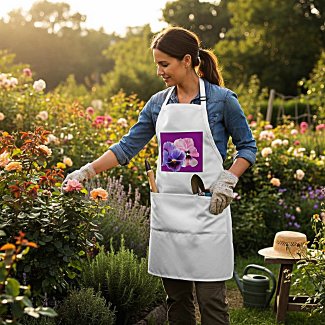
There are products on Zazzle with pretty mockups created by Zazzle. But there are also products which have no mockup image. One of these products are aprons. 

When I created the design for the apron AI did not yet exist, and there was only a very complicated way to create mockups using photoshop. I must admit that I had a look into that and decided it would take too much time to get anywhere near creating something reasonable.

However, with AI today, there are two ways to create nice mockups. 

  • Use Dynamic mockups
  • Use Chatgpt
Mockups make your product interesting for customers. Especially on such a large platform like Zazzle it is important to get the attention of potential customers, and you can do this by creating interesting mockups.
This will force you to think about your designs and your possible customers: Will gardening people love to wear this apron? 


Or will someone who obviously loves to have plants and flowers at their home love to wear it?
By the way, the upper mockup was created with Dynamic Mockups, and the one on the left with Chatgpt.

2026-06-22

Venetian Mask - Two images, one prompt

Both images have been created with the same prompt and two different AI Art generators. The image on the left was created with the help of Nightcafe Studio, and the image on the right was created by using Deep Dream Generator. As you can see there's quite a bit of a difference between them. 
I am not sure which of the two is my favorite - there's something interesting in both of them: The serious facial expression and the way the feathers frame the face in the left image; the richly decorated mask and the smile on the face in the right image. 


2026-06-17

Another piece of abstract art


I love trying out color combinations, and I love to experiment with adding markers to my acrylic ink paintings. In this case I used a dark blue alcohol marker for the background. 

In addition to that I tried something new: A few weeks ago I bought some Molotow Sketchers for the first time. These are water based markers. I hadn't touched them yet and decided to try applying them on some spots over the acrylic ink. It worked. 

The whole process of painting was very satisfying, relaxing and joyful. It always takes a bit of preparation - getting my table covered with newspapers, fetching the paints, the water container and the brushes - and it takes a bit of time to put everything away afterwards, but it is definitely worth it!

2026-06-10

Using Prompt Silo

Pheeds Prompt Silo has a Prompt Builder Interface which allows you to generate highly detailed prompts by selecting specific variables from drop-down categories (e.g., subjects, artist styles, lighting, camera angles, and writing tones).

I used it to create the following prompt: 

zebras drinking water baroque chiaroscuro art


First I tried Meta AI but obviously it had some difficulties with rendering zebras and produced some very strange results.Then I used this prompt with ChatGPT and got the image. which you can see on the left side.

I then went to Leonardo AI, inserted the prompt above and Leonardo automatically changed the prompt to:

A dramatic scene of zebras with distinctive black and white stripes gathered around a serene water source, rendered in the style of Baroque art with intense chiaroscuro contrasting light and dark, the zebras' bodies illuminated by a soft, golden glow, while the surrounding environment is shrouded in deep shadows, with meticulous attention to detail and texture, the overall mood is one of tranquil elegance, inviting the viewer to step into the heart of the African savannah at dusk, with the warm colors of the setting sun reflecting off the water's edge, and the zebras' gentle movements suggesting a sense of peaceful coexistence with nature.

Unfortunately the result was not very satisfying, as you can see here:

Looking close at the zebras you will notice that something is wrong with the way they stand together. Nice landscape, nice lighting, but wrong animal bodies.

Of course I could have tried out other AI Art Generators, but I didn't feel like it. I simply haven't got the time to do it just now.

But I did learn something:

  1. Prompt Silo can be a useful starting point.
  2. It is fun to create with AI, but you have to check the outcome. If you have the time, try the same prompt with different AI Art creators.