Showing posts with label inkscape. Show all posts

2026-02-04

From a vector drawing to an AI 3D illustration

 Quite some time ago - actually in 2022 - I did some vector drawings using Inkscape. Here is an example: 

I must admit, it is not very good vector art. I should have spent way more time working on the image. But it is as it is.

Now I was wondering what I could do with it with an AI image Generator. 

The first step was to upload the file to imageprompt.org in order to get a reasonable prompt which I could copy and paste.

The second step was to go to Nightcafe Studio and create an image with it.


And here is the result. I had added "wearing a red scarf" in the prompt and changed the colors given in the prompt.

As Nightcafe Studio offers to remove the background of the created images for free, I could easily do that and use the owl as a design element in my Zazzle store. 

2025-12-17

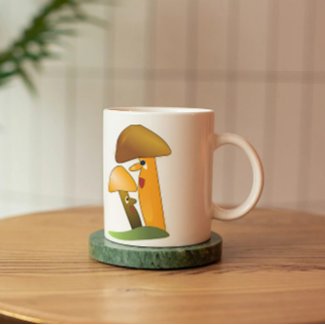
Talking mushrooms


I did the design for this mug a loong time ago. I used Inkscape for it, an open source alternative to adobe illustrator. There are some designs in my Zazzle shop I am still proud of - and this is one of it. You can look at it and think of a story - an old and experienced mushroom telling a younger one about the important part mushrooms play in the forest, for example. 
So you can use this mug to drink your morning tea and meditate a bit about mushrooms or just create your own story in your head. 

2022-12-14

Colourful beetle, done with Inkscape


I used some gradients on this beetle in Inkscape. As beetles do have so many colours you cannot say whether this beetle really exists - it could, could it not?


2022-12-02

Grinning skull, drawn with Inkscape


I used the photo of a skull as reference, but then did my own creation with Inkscape. I practised again with gradients. I thought about adding a flower hanging out of the skull's mouth, but that may be done later.

2022-11-28

Happy Flower Journal

Have you ever thought of doing a gratitude journal? I find it so important to notice all those things we can be grateful for - to live in peace, to have a warm home with running water, to have friends who care. And how about those moments of happiness when you feel the sun on your skin or drink a delicious cup of tea?

2022-11-25

Another little monster

As I mentioned in my last post, I love using the gradient tool in Inkscape. I am still struggling with it now and then, but usually it does what I want it to do. 

2022-11-22

Red and Blue Candle


I have been playing around with gradients in Inkscape lately - and this abstract red and blue design was one of the results. I first hated the gradient tool because I didn't know how to use it properly - now I am almost obsessed with it.

2022-10-28

Another cute little creature


This little creature was not planned - it was born in the process of playing around with gradients in Inkscape. Just now I am deeply in love with this open source vector software. I am continuously learning, which is fun. 


2022-10-21

Just playing with gradients in Inkscape


Not too long ago I hated the gradient tool in Inkscape because every time I tried to do something with it it did something else - or nothing at all. However I am a quite stubborn person, so I kept on trying. And then, suddenly, I realized that I could actually handle it. Don't get me wrong, I am far from perfect with it, but at least I know what I am doing and more and more I have fun playing with it. Now I am a bit of a traditional artist as well - I love to paint abstracts with acrylics, gouache or watercolour, even markers. So I am now experimenting how to do abstracts with Inkscape and the gradient tool. Again, I am far from perfect. But I am having fun!


2022-10-10

Another little monster


At the moment Inkscape is my favourite tool to do illustrations. This cute green monster vector drawing is based on a pen and ink drawing. I scanned the drawing and vectorized it, not without changing a bit here and there. 


2022-10-04

Mermaid


I had worked on this mermaid in Inkscape in 2020. However I was not satisfied with the result, but I still had it on my harddrive. Just a few days ago I decided to give it a new try. I noticed how much about Inkscape I had learnt in these two years. And I learnt that it is important to keep these files even if one wants to throw them into the bin. 


2022-09-21

Bat


Bat-creature, created with Inkscape

I must admit that I have my difficulties with the gradient tool in Inkscape. But I somehow forgot that there is a tool in Inkscape called "Gradient Mesh" which - in my humble opinion - makes it far easier to create gradient effects. Fortunately there are a number of videos on YouTube which explain how Gradient Mesh works, and after having watched some of them I am kind of hooked on that tool.
The bat above is still work in progress - there are a few things which have to be worked on still.


2022-09-14

Cute blue monster


Blue monster, done with Inkscape

Once there was a quick pencil sketch, then an ink illustration colored with Gouache. Then I vectorized the sketch and changed it quite a bit in the process. The advantage of digital work is that you can make changes again and again until you are satisfied with the result. Which, on the other hand, leads to the difficulty that you don't know when the work is finished. I personally find it difficult to let it go, to call a certain piece finished. In earlier times I definitely was too quick. I sometimes shudder when I look at drawings or illustration I did some years ago. That at least has changed...


2022-09-02

Whimsical Waterbird Magnet


In August I went back to Inkscape after a long period of not doing any vector art. I had been doing "traditional art" instead - painting with acrylics, gouache, watermedia and such. It took me some time to get used to this open source vector program again, but fortunately there are loads of Inkscape tutorials on YouTube!

2022-08-24

Cute Christmas Owl


At first there was the failed Inkscape drawing of a bird. I had tried something new, failed to create the design in the way I wanted it to be and then left it unfinished and forgotten on my hard drive. Months later with a bit more experience with Inkscape and the help of a few YouTube videos I gave it a new try. The result was a cute owl, which had nothing whatsoever to do with Christmas. Then I thought it could look nice with one of these Christmas hats, and maybe a kind of red coat on. You can see the result of my work above. 

2022-08-17

Tree character done with Inkscape

Tree character

Some time ago I thought that doing traditional paintings or drawings and doing digital art with Inkscape are opposite to each other. You can do either the one or the other. I do not think anymore that it is true. The origin of this tree character was a sketch done with pencil and then a gouache painting. But I wanted to go a step further and create a digital piece out of it. I scanned it in, openened it in Inkscape and the result of this doing is what you can see above. It is not a copy, it it something different, but it definitely has its origins in traditional art.


2021-11-12

Merman - Version One


The basis of this Merman character was a quick pencil sketch; I then scanned that sketch and  converted it into a vektor line drawing with Inkscape. I did it in a way which allows me to make changes to the body, the tail or the arms and head of the character without having to do it all again. I then printed the lineart and tranferred it to watercolour paper. The coloring was done with liquid watercolours (or watercolour inks as they are sometimes called), using the colours cyan and chartreuse, which is a very light green. The red patches on the skin were done with alcoholbased markers.


2021-11-03

Turkey creature traditionally coloured: second version


I used liquid watercolours to colour the second version of the turkey creature. I mainly used Chartreuse, which is a very yellowish green, and fir green, which is a blueish green. And I used a white inktense pencils for the eyes.


2021-11-01

Turkey creature traditionally coloured - 1st version

This time I printed out the lineart version in Inkscape, traced it on my watercolour paper and coloured it with my stabilo 68 pens. In my opinion this guy has a lot more character than the vektor image. He looks quite determined and a little bit grumpy - doesn't he?


2021-10-29

Turkey character: vector painting


In the beginning there was a traditional sketch inked with a staedtler pigment liner. While I was watching a course about lineart done with Inkscape over at Skillshare I had the idea of using the scanned ink sketch for doing a lineart drawing in Inkscape. I hadn't used Inkscape for quite some time so it took me some time to refresh my knowledge of this software.
I then saved two versions of the drawing - one as a lineart drawing and the other one you can see here.