A few last hours and then 1925 will be history.
So I wish you all
Happy New Year! May it bring you Joy. Creativity, Love and Health!
So I wish you all
Happy New Year! May it bring you Joy. Creativity, Love and Health!

May your home be filled with golden light, To chase away the chill of night.
May every gift and every word, Be the sweetest things you’ve ever heard!
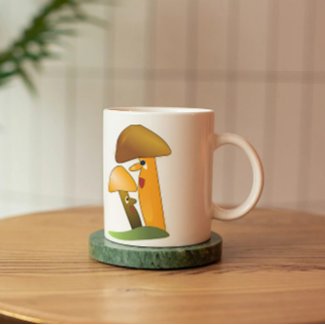
I did the design for this mug a loong time ago. I used Inkscape for it, an open source alternative to adobe illustrator. There are some designs in my Zazzle shop I am still proud of - and this is one of it. You can look at it and think of a story - an old and experienced mushroom telling a younger one about the important part mushrooms play in the forest, for example.

I decided to play with it and uploaded the photo to generateprompt.ai in order to get a prompt for it. I got the following prompt:
"A historic Gothic-style church with an ornate facade and tall, pointed windows, featuring a tall, spire-topped steeple with a weather vane at the top. The church is situated in a European city square, with surrounding old buildings and a clear blue sky overhead. In the foreground, there is a fountain with a rectangular basin, and a few children playing in the square, along with two women walking nearby. The scene is bright and sunny, highlighting the architectural details of the church and the lively atmosphere of the square."
I then went to piclumen.ai and insert it. Here is the result:


However there is beauty in winter - like in the image on the left. The crispiness of the frozen leaves in contrast to the red of the berries - looking at such an image makes me happy. With all those AI generators on the web I can easily create my happy version of winter!

Alcohol markers on the other hand are flat; you can get some kind of shading by going over the same spot twice with the same marker, or, as I did in the last painting, by using inktense pencils on top of markers.
With this painting however I wanted to create a strong contrast between the acrylic ink background and the shapes painted with markers in the middle of the image.
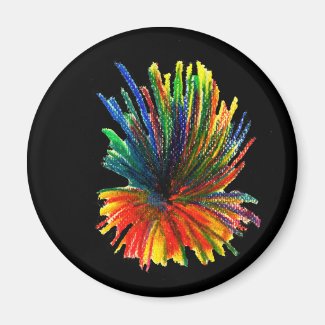

Why acrylic ink? Well, I wanted to create quite some contrast between the shapes in the middle and the background. And acrylic ink is really, really black. In addition to that it saves marker ink. I only needed a few drops of acrylic ink to cover the background.

I used Microsoft Copilot and only the word "trick-or-treat". The result was the image on the left. It even had the words spelt correctly - which is something AI Generators had a problem with for quite some time.
I must admit that I like being surprised - as much as I like getting AI doing exactly what I want them to do...

I have been using my AI images for card design, for designs on my Zazzle store and I have been putting the images into frames and put them on the walls of my flat. Regarding the latter there is one problem: Here in Germany you do not find frames for square (1:1) images easily. But I have a lot of very nice AI images which are in the 1:1 format, and it would be a shame not to display them.
Yesterday I suddenly rememberd that I have quite a few hard foamed panels. So I fetched one of them, grabbed one of my 1:1 images and mounted it on the panel.


I have been using Grok AI for some time now. Grok allows not only the creation of images via inserting a prompt, but also the upload of images and the editing of them.


What I have up to now never seen on YouTube are abstract art pieces done with alcohol markers. This may be due to the fact that alcohol markers are not lightfast and you need to take some precautions for your art works in order to prevent fading. I usually scan my alcohol marker artwork and put the originals away. And: I work with rather small format. I have no studio, so I have to work small. However I deeply enjoy doing those abstract artworks, and although some of them might look similar, everyone of them is different.

This is the original image, created using Nightcafe Studio. A knight in a worn armour is standing on a rock at the sea, with waves crashing in and rain coming down from a dark sky.

Same scene, different style: The style is watercolor now, much lighter, sun coming in, the sea is much more peaceful.
This image was created with the "Edit image" tool of Grok.
I haven't done much with this took yet, but everytime I use it I am amazed by its possibilities.

It was the first time I used this method, but it won't be the last, as I am quite pleased with the outcome!
And I must say that I really love the Bristol paper I am using with my alcohol markers!
I love to create images with AI Art Generators, and I also love to tell stories, even in English, my second language. For a long time it has been eigher doing the one or the other. But now I can see combining those two. Here's an example:

So I thought of a short sentence which could introduce the reader to this situation.
I uploaded the image to photopea, changed the color of the text to white and inserted the text.
Then I exported the image as jpg - and voilà! My first ever comic book panel was created!

The image on the right was created using Piclumen AI, which has a nice free version. You are getting reward points by uploading your images to social media (pinterest for example) and liking and commenting other people's creations.


I grabbed some of my Gouache tubes and started. And - I had a blast! This does not mean that I will stop making art with my alcoholbased markers, but I can imagine - now and then - to do something Gouache-y!
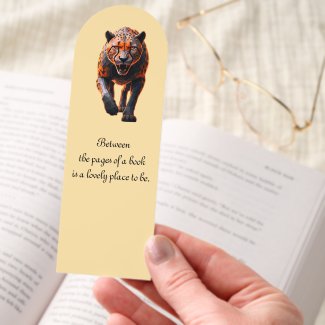
For a long time Zazzle didn't have proper bookmarks. They had some, though, which were so tiny that I would not use them in one of the books I am reading. I looked for a solution and found out, that you could cut out two bookmarks out of a postcard and designed some with Photoshop. But would you do the cutting as a customer? Not really.

But I now know that painting / drawing abstract art with alcoholbased markers plus shading with inktense pencils is the thing I really love to do, and so doing these swatches was an absolute must.
However I am still creating AI images, and lately I have been creating a lot of images with Grok.

As you can see on the right, the result is quite similar with a bit of change of color in some places.

It took me almost one week, and the color swatches on the image are only a small part of the swatches I had to do for all my alcoholbased markers.
I decided to cut the paper in strips, and not do my swatches on one sheet of paper. Having them on paper strips makes it easy to take them with me when I go to the store in order to buy new markers. It also makes it easier to compare the swatches on the paper with a color palette. It also makes it easier to select the markers for the next painting.
I am an AI artist and a traditional artist who focuses on abstract art. Colors and shapes are an important part of abstract art, and so I am always looking for color palettes. There are hundreds of color palettes on the web, but most of them are not the kind of what I am looking for.
So I was very glad when I found coolors.co, a great online tool to create palettes from your own images (you can do way more with this tool, by the way)
Here's an example:

This can be done easily with a free account; with a pro account you can get the hex numbers of each color, in case you need them for digital painting.


I love to try out new things, even running the danger of damaging artwork I'd already done (at least, I got a scan of it!).

I remembered that I had gone over my marker paintings with inktense pencils and quite liked the effect. So why not try using inktense pencils over acrylics? I did a quick search on YouTube, and could not find anybody who'd tried it. So I had to experiment.
And this is the result:

Well, it seemed to work. It is definitely not as flat as the painting above. And I definitely want to keep on with the combination of acrylics and inktense pencils.

Now we have the 1st June. The first half of the year has been quite creative, not only regarding the creation of AI images, but also regarding the painting of "traditional" art. I actually managed for the first time to get a nice balance between those two kinds of art creation. I hope to keep this balance as the year will go on.

The Ecoline and Colorex watercolor inks which I am using are not lighfast eigher. They are very intensive when you use them without watering down. I wanted to find out how much I could thin them down by adding water and was surprised by the results: I used left over ink from the day before, added some drops of water and still got some color on the paper. I then let it dry, then placed ink from the stabilo pens on selected spots and used my waterbrush to dissolve the ink. Nice!


Instead of criticizing myself for not adhering to my goals I thought about whether it is a proper goal for me. What is my most important goal? The answer is: to have fun being creative and doing art, and with that the kind of medium I am using is not important for me.
I used Ecoline watercolor inks and Colorex watercolor inks, and, of course, I did an abstract painting. Not that I do not like landscape paintings, or floral paintings, or even stillife (although this kind of painting does not speak to me as much as the others do), but I am an abstract painter, inrerested in shapes, textures, and color combinations.

In April 2025 however I rediscovered my acrylic paint tubes, and yes, I felt comfortable with them and enjoyed the process of applying paint to to the watercolor paper. This does not mean that I am not having those moments of doubt. But I manage to overcome them and finish the painting. So I will continue painting with them.

Now, more than ten years later I suddenly felt the urge to try them again. So I grabbed a bigger brush, some Schmincke AcrapZkademie acrylics and a Rico Design Fir Green. It did not go as I intended to. It looked like crap. I was considering calling the whole thing a failure and giving up. But I somehow did not want to. So I stopped painting and did something else. The next day I looked at the painting again and got the idea that I might turn the landscape format into a portrait format. I kept on painting. In the end it irned out - well, let's call it acceptable.

Cogniwerk AI is one of my "newer" AI Image creators. To create one image costs one credit; every account has been given a certain number of credits, and when you have used up your credits, you can request more.
Many AI Image Creators have difficulties with horses - they tend to create animals with five legs. I wanted to know what Cogniwerk does with a prompt like this:
A black mustang galloping over a yellow green meadow, vector style
Well, it actually added an additional leg where it does not belong. However they offer Inpainting, and so I managed to create the anatomically correct mustang in the image above. So up to now I am very pleased with Cogniwerk AI and will use it regularly.

But I enjoy creating all those color variations. Look how many shades of blue are in that painting on the left - dark blue, light blue, purplish blue!

However I changed my working process a bit: I first applied the grey lines with alcoholbased markers and then began to fill in the colors. In the past I had often just let the colors flow and the shapes form themselves, but this time I spent some time thinking about which color to put where.
I had fun mixing the colors and learning while doing so. I basically used three colors: Green, yellow and hazelnut.


In the afternoon I do all kinds of digital work - scanning and processing my paintings, creatingpieces with Artificial Art Generators, watching helpful, inspiring and motivating youtube Videos.
Of course there are days when I cannot keep this rather rough schedule - days with doctor appointments, days when I am invited for coffee by my neighbor, days when I allow myself to spend some hours at an art shop. However in general I want to keep the aforementioned time blocks because they help me to maintain a balance between doing art traditionally and doing art the AI way.
Today is the second last day of February. So it's time to look back at this month regarding my art activities. I actually managed to paint six pieces done with alcoholbased markers and colored pencils, and with the last piece which I scanned in today I switched to the combination of markers and inktense pencils.

Sometime last year - or even the year before - I discovered Starry AI. I wrote down the webadress, but other than that I didn't do anything with it. A few days ago I found the note with the address on it, and tried it out. I must say that I am very pleased with the results I am getting.
First of all, I have the free version. The free version has got its limits regarding the format: you can only create images in portrait format. But: you are able to get five lumens (or credits or tokens) by logging in each day. You are also able to earn lumens every three days by posting your images on instagram or X (twitter). And, as I mentioned above, the results are very, very nice!

I wanted to create an image showing a cute rat carrying a bowl with coffee beans. I first tried Nightcafe Studio, but didn't quite get what I was going for. So I used the magic prompt Nightcafe had created and applied it on Starry AI.
The image on the left more or less shows what I had in my mind. This is one of four images and the one I liked best.
So Starry AI has become one of my favorite AI Image Generators, together with Nightcafe Studio, Bing and Mage Space.

Of course I felt very honored when the woman who I have been meeting regularly in my neighborhood cafe asked whether she could buy the original. However I told her that it was done with markers mostly which are not lightfast. I had done a bit of research on Etsy and found out that many people there are selling the digital files of their artwork. So I asked her whether she would be interested in getting the digital file which she then could upload to a printer. She said yes and we agreed on a price.
Yesterday she handed me the money, and I felt great and I am still feeling great! It motivates me to keep on creating paintings in that kind of style. Some time ago I mentioned "The complete book of Color Harmony". It gives you hundreds of possible color combinations. I just have to go through this book, select a color combo and then go for my markers.